Removing your personal information from Google is easier than many people think, provided you know where your information appears and which removal method to use. Google gives users several free tools to request the removal of information from search results, while website owners and data brokers also offer ways to delete information directly from the source.
Whether you’re trying to remove your home address, phone number, email address, government ID, or outdated information, this guide walks you through every legitimate option available. You will discover how to erase personal information from Google without spending a dollar, how Google’s Results about you feature functions, when to file a Google removal request, and what to do if Google fails to remove the information about you.
Why your personal information appears on Google

Google doesn’t create the information you see in its search results; neither does it own them. Instead, its search engine indexes any web pages that are open to the public. When someone searches for a keyword within those indexed pages, the search engine checks its findings. These can include your name, phone number, email address, or home address.
How did your information reach the web pages? Well, some of these reasons include:
- Created public social media profiles.
- Registered on forums or discussion boards.
- Listed your business or personal website.
- Appeared in news articles or public records.
- Shared information on blogs.
- Signed up for websites that later exposed your information.
- Had your information collected and published by data brokers.
Data brokers aren’t the only ones collecting your personal information, spyware and tracking software on your devices can also capture your browsing habits, keystrokes, and sensitive data. Free spyware removal tools can help detect and remove these threats.
In fact, knowing “how” is an important step to take before looking for how to remove something from Google Search. Sometimes, what you see in Google results is not from the engine itself. Web hosting platforms may disclose your credentials under their policies.
Pro tip: Some stolen information can even end up on dark web marketplaces and forums. If you’re curious about this hidden side of the internet, you can explore some well-known dark web sites to understand what exists beyond regular search engines.
What personal information can you remove from Google?
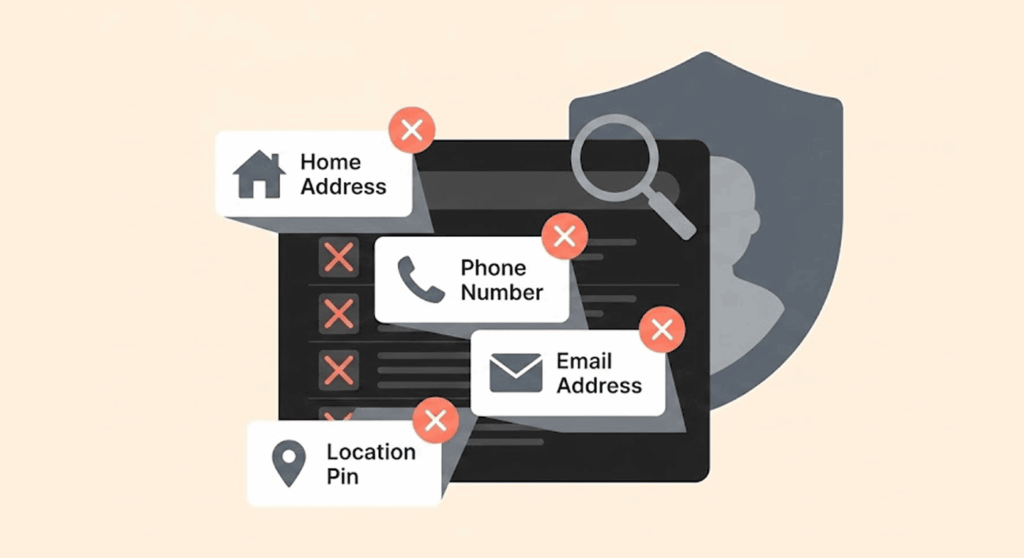
If the content you want to remove from Google meets its removal policies, Google will approve your removal request.
Some of the personally identifiable information that you can request to remove includes:
- Home addresses
- Personal phone numbers
- Personal email addresses
- Government-issued identification numbers
- Tax identification numbers
- Bank account information
- Credit card details
- Confidential login credentials
- Images of identity documents
- Handwritten signatures
- Medical records
- Financial records
- Employment records
- Certain legal documents
- Non-consensual explicit images
- Copyright-infringing material
- Defamatory content according to Google’s judgment
Additionally, Google approves the request of homeowners to blur the exterior of their home in Google Maps Street View. This measure comes in handy when you want privacy or have safety concerns.
What Google usually won’t remove

Many people wish that Google could just take their information from any webpage. But that’s not the modus operandi.
Google generally won’t remove:
- Accurate public records
- News reports
- Government documents
- Court records that remain legally public
- Information considered to be in the public interest
- Opinions or content that doesn’t violate Google’s policies
- Content published by others that doesn’t contain removable personal information
If the information is lawful and open to the public, then quickly contact the website owner directly, not Google.
Why removing your information from Google matters

The internet is open to everyone. You can’t tell them apart until the bad ones hit you hard.
When your personal information sits on one or various services on the internet, strangers have access. It can then cause birth identity theft, phishing attacks, financial scams, cyberstalking, and online harassment. If you suspect someone has already exposed your sensitive details, check whether your information has ended up on the dark web and what steps you can take to protect yourself.
Simply put, you want to remove your personal information or reduce what’s available online. That way, you:
- Guard your identity
- Cut down how scammers reach you
- Reduce targeted phishing attacks
- Improve your online privacy
- Protect your professional reputation
- Reduce how easy it is for data brokers to profile you
Even if you remove only your phone number or home address, it significantly reduces what criminals can gather about you.
Google is just one place where your details might appear. You should also remove your personal information from other websites to reduce your digital footprint and make it harder for strangers to find your details.
Most effective ways to remove personal information from Google
There isn’t one universal solution because your information may exist in several different places. The most effective strategy combines Google’s own removal tools with requests to website owners, privacy improvements, and ongoing monitoring.
For users seeking a more hands-off approach, paid data removal services like Incogni can handle the repetitive work of contacting data brokers, monitoring for reappearing information, and sending fresh removal requests as needed.
Let’s start with Google’s own privacy tools.
Use Google’s “Results About You” tool
The easiest way to remove personal information from Google for free is by using Google’s Results About You feature.
Originally introduced to help people find personal information appearing in search results, Google later expanded the tool with automatic monitoring. Today, it can regularly search for your contact details and notify you whenever new results appear.
Instead of manually searching your name every few weeks, Google performs much of the monitoring for you.
How to set up Results About You
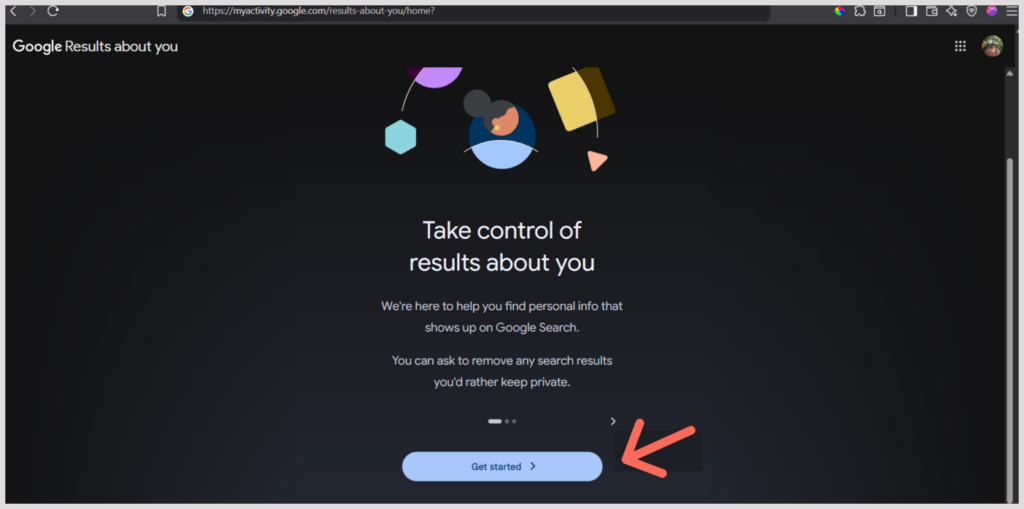
- Sign in to your Google Account.
- Open the “Results about you” page.
- Select Get started.
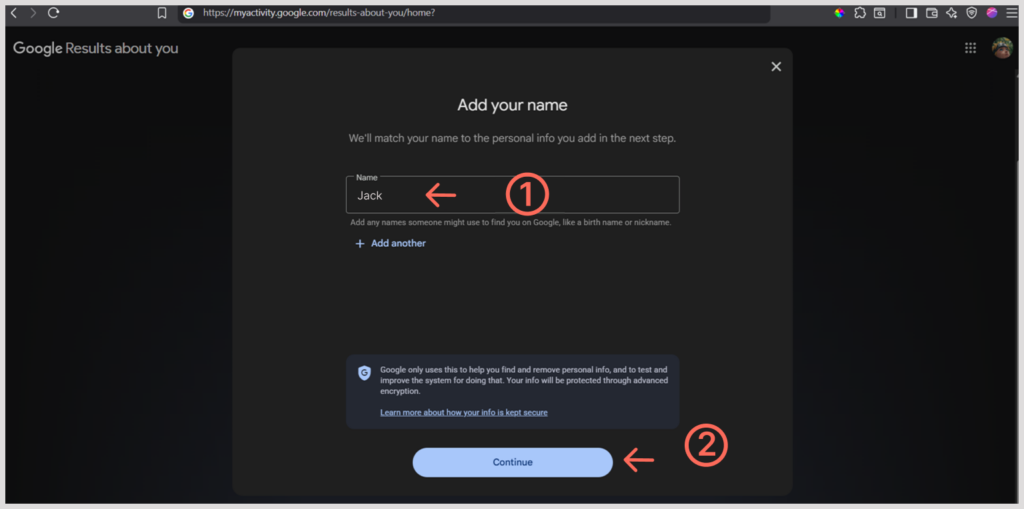
- Enter your full name.
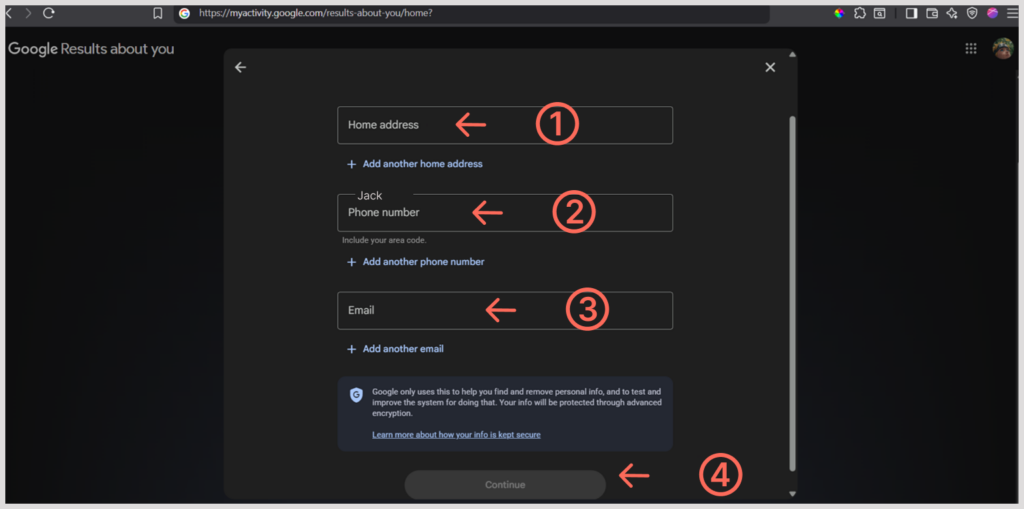
- Add details such as:
- Home address
- Personal phone number
- Email address
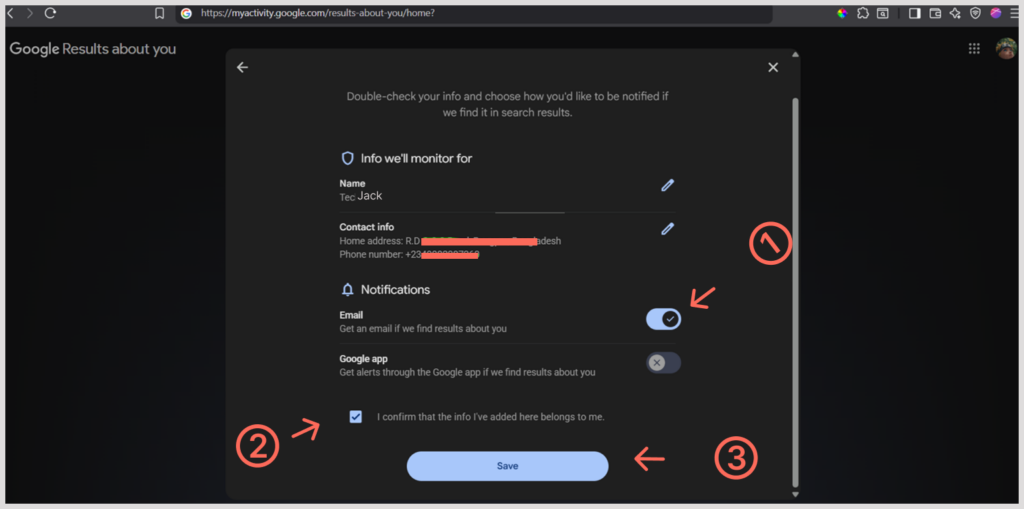
- Confirm that the information belongs to you.
- Enable email notifications if you want Google to monitor future search results automatically.
- Finish the setup process.
Google typically completes the initial scan within several hours.

If the tool finds your personal information in Google Search, you’ll receive a list of matching results. You can then review each one and submit a removal request directly from the dashboard.
Note that “Results about you” doesn’t search for images or videos. If you want to remove photos or videos, use Google’s special removal request instead.
Submit a Google removal request
If you already know the exact search result you want removed, you don’t have to wait for Results about you to find it.
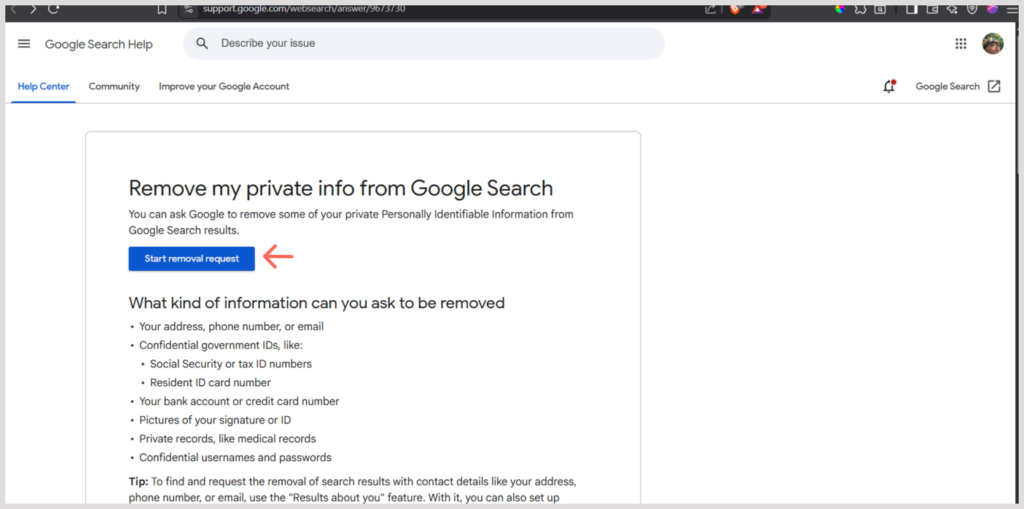
Google allows you to submit a Google removal request directly through its personal content removal process.
This option is especially useful if someone has published:
- Your home address
- Your phone number
- Your email address
- Images of government-issued identification
- Financial information
- Explicit content shared without your consent
- Other qualifying personal information
Google may ask you why the content violates its removal policies. So, when submitting, provide supporting evidence, such as screenshots or URLs.
Contact the website owner first
Submitting a Google removal request only works on content that qualifies for Google’s removal policies.
In many cases, the original webpage remains online and can still show on other engines or via a direct link. So, to completely remove your personal information, contact the website that published it.
Many websites have one or more of the following:
- A contact form
- A support email address
- A privacy request page
- A “Contact Us” section
- A designated Data Protection Officer (DPO)
When making your request:
- Clearly identify the page containing your information.
- Explain exactly what information you want removed.
- State why you believe it should be removed.
- Include the page URL.
- Be polite and professional
Once the website deletes the information, Google will recrawl the page and remove the unavailable or outdated search result automatically.
Ask Google to remove outdated search results
A website owner can remove your information, but Google continues displaying the old version in search results.
In that case, the engine’s index has not crawled the page again. You can wait for the engine to revisit the page naturally or request a faster refresh.
Google’s Refresh Outdated Content tool nudges its crawler to check for recent changes on a webpage. If your personal information has already been removed from the website, Google can update or remove the outdated search listing much sooner.
This isn’t the same as a standard Google removal request. It only works after the original webpage has already changed.
Remove personal information from your Google account
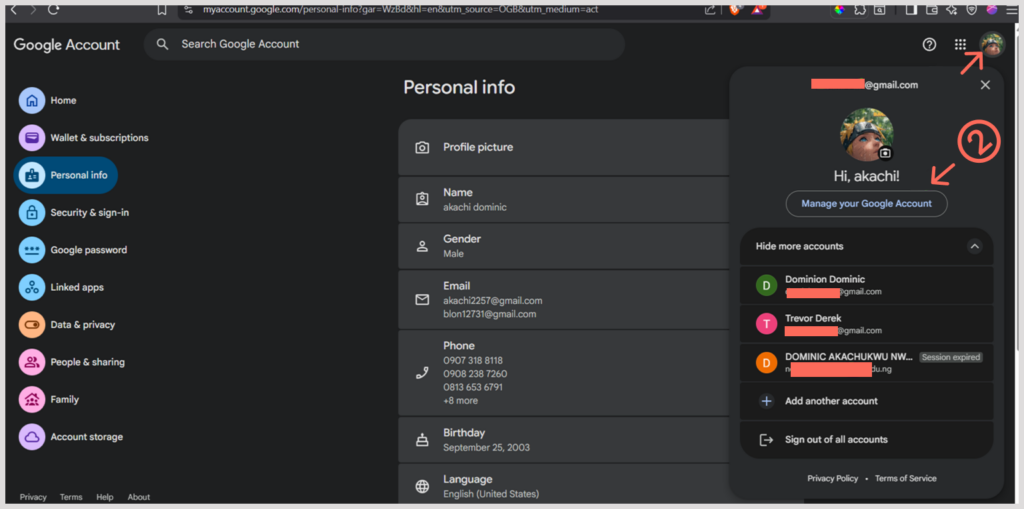
If you’re searching for how to remove personal information from Google accounts, reviewing your account settings is one of the easiest places to start.
Many users unknowingly share personal details through their Google profile, which may be visible across Google services. Open your Google Account and review the following sections:
Personal Information
Check details such as:
- Full name
- Birthday
- Gender
- Phone numbers
- Recovery email addresses
- Profile picture
Remove or update any information you no longer want associated with your account.
People & Sharing
Google lets you control who can view your profile information. Review your visibility settings and limit access wherever possible.
Data & Privacy
Visit the Data & privacy section to manage:
- Web & App Activity
- Location History
- YouTube History
- Personalized advertising
- Search history
Deleting old activity won’t remove it from Google Search results, but it reduces the amount of information stored in your account.
You can also clear your Google search history to remove past searches from your account and take another step toward protecting your privacy.
Pro tip: If you want to limit how much information search engines collect about you in the future, consider switching to a more private search engine that doesn’t track your searches or build advertising profiles around your activity.
Remove personal information from Google Chrome
Many people search for how to remove personal information from Google Chrome, but Chrome itself doesn’t publish your information online. Instead, Chrome stores browsing data locally on your device and synchronizes some information with your Google Account if sync is enabled.
To remove personal information from Chrome:
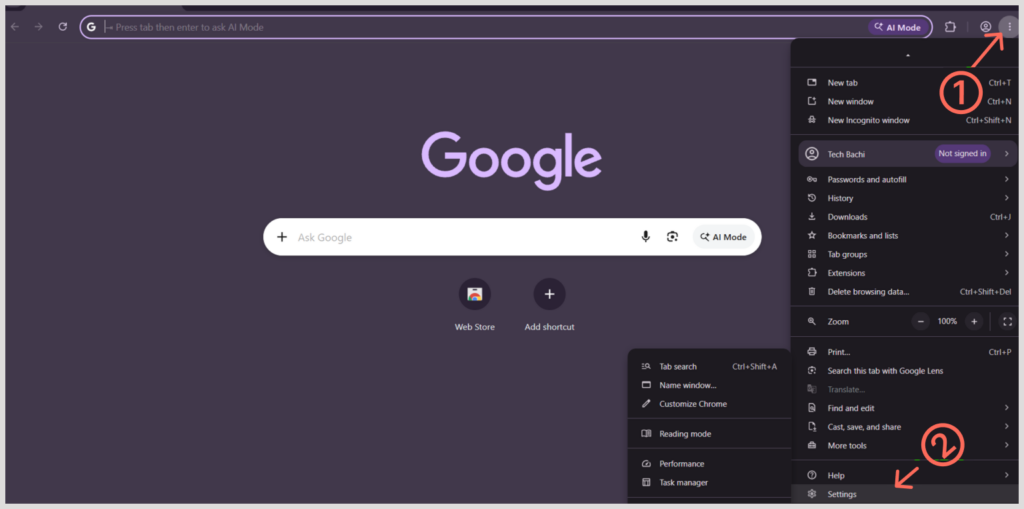
- Open Chrome.
- Click the three-dot menu.
- Select Settings.
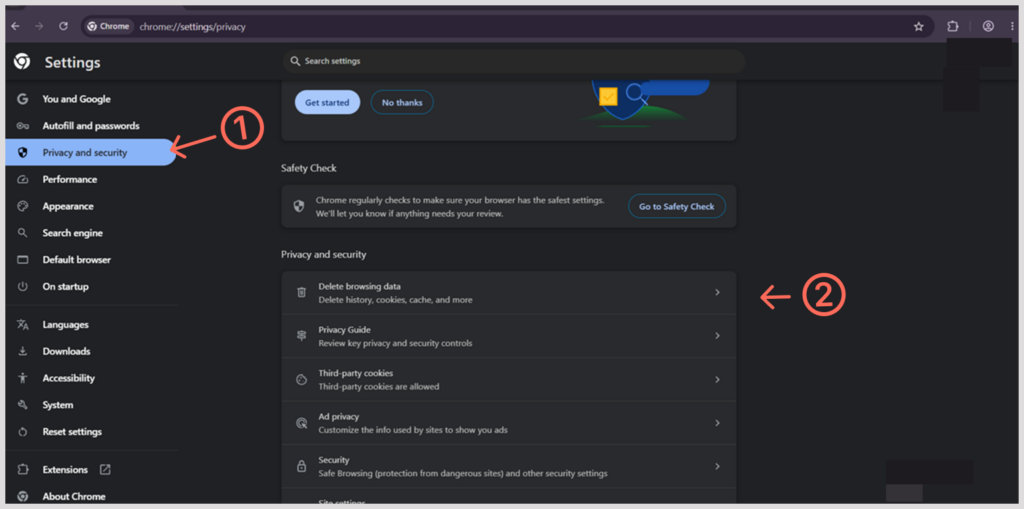
- Open Privacy and security.
- Click Clear browsing data.
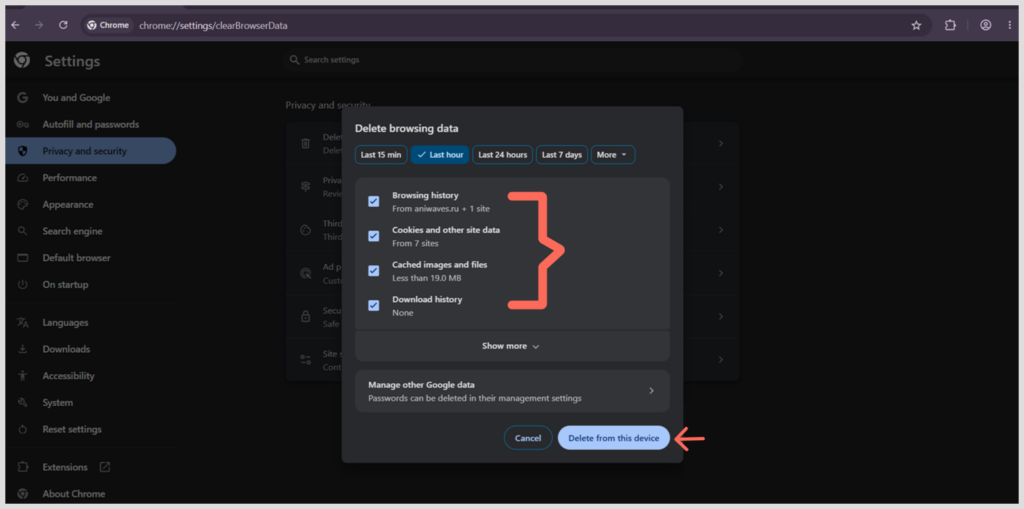
- Delete:
- Browsing history
- Cookies
- Cached files
- Autofill form data
- Saved addresses (if no longer needed).
Remove personal information from your Google phone
Here’s how you can remove personal information from Google phone:
For Android devices, go to “Google” in Settings, and select Manage your Google Account. Here you can:
- Delete search history.
- Remove saved locations.
- Clear voice activity.
- Delete Assistant history.
- Remove old contacts synced with Google.
- Delete autofill information.
- Review saved payment methods.
Don’t forget to review the settings for “Find My Device” and “Location History” to stop Google from storing the location information of your phone.
Delete old social media accounts
If you have an old social media profile, it often ranks highly in Google Search, no matter how long dormant.
On your browser, search “your name + platform name,” e.g., Facebook, X, Instagram, LinkedIn, Reddit, Pinterest, Tumblr, etc.
Log into the ones you no longer use:
- Delete them completely.
- Remove personal details.
- Change public visibility to private.
- Remove phone numbers and addresses from your profile.
Once the page disappears or becomes private, Google usually updates its search index over time.
Remove information from data broker websites
Your information on public records, loyalty programs, or even marketing databases are open to data brokers. They can collect your:
- Home addresses
- Previous addresses
- Phone numbers
- Family members
- Estimated income
- Property ownership
- Age ranges
Find the broker’s privacy page or “opt-out” request and follow its verification process. That way, you reduce the amount of personal information available through Google searches.
For those who find this process overwhelming, dedicated data removal services like Incogni and DeleteMe can automate the opt-out requests across hundreds of data brokers.
Delete unused online accounts
Many websites continue displaying user profiles years after people stop using their services. Search for your:
- Username
- Email address
- Full name
If you find any, delete the ones you no longer need. Also, remove any personal information before closing them. Do this, and you reduce your overall digital footprint for good.
Monitor your online presence regularly
Removing your personal information is not a task you do once and for all. New search results can appear whenever another website publishes your information.
So, what you can do is:
- Run periodic Google searches for your name.
- Monitor your phone number and email address.
- Keep Results about you enabled.
- Every month, look at your Google Account privacy settings
- Opt out of new data broker listings as they appear.
That’s how you catch new exposures early before they spread across multiple websites.
Common mistakes people make when removing information from Google
A lot of people are under the impression that by submitting a removal request, their personal information is scrubbed off from the Internet permanently. Unfortunately, they are mistaken. Below are some of the most common mistakes to avoid when trying to protect your privacy.
Assuming Google has control over the material
Google indexes sites but does not control or host them. The original site may still store your personal information. Other search engines are likely to pick up the information contained in the original website too.
Neglecting to consider the owner of the original site
Users tend to only think about Google in this instance. Keeping in contact with the site owner in one way or another could be a good idea. Most of the time, removing the source of the information itself is more beneficial than getting rid of the search result alone.
Forgetting about data brokers
Even if the original site removes its information, this does not necessarily mean that data brokers won’t give away the information. Users have to find out the top sites offering people search services and try to submit requests for removal.
Keeping useless online accounts
Most of the social media sites, forums, shopping sites, etc. contain user information that one may have forgotten about long ago. Deleting all of these accounts could help you significantly decrease your digital footprint.
Expecting it to happen right away
Google handles each request separately. Hence, it may take a while before something changes in Google search results even after your request is confirmed.
Not enabling Results About You
Many people submit one removal request and never check again. Google’s Results About You feature can continue monitoring search results and alert you whenever new personal information appears. Keeping it enabled saves time and helps you respond quickly to future privacy issues.
Conclusion
Understanding how to remove your personal information from Google is a highly effective approach to begin improving your digital privacy. The service offers a series of free resources that assist users in taking down some of their personal information from the search results. However, protecting your own information involves a more comprehensive approach.
It starts with removing the information from the original website if possible; after that, one is able to use the “Results about you” service and file a Google removal request for that which qualifies. Make sure to go through your Google Account’s privacy options in order to remove any excess information from your Chrome browser and Android smartphone, perform any clean-up of unused social accounts, and unsubscribe from brokers that exploit your data to lessen your general digital footprint.
Bear in mind that taking care of your privacy is not something done just once. New information may surface over time as a consequence of public records or social media activities or brokers operating with your data. Periodically checking on your presence online is a great way to detect new information. All of this contributes to fighting against scammers.
FAQs
Indeed, that is possible. Google has various free tools in place. You can apply “Results about you” in order to check the results that come with your private data, send a removal request to Google on suitable information as well as demand some outdated results to be changed after the page itself actually changes. Apart from that, you can also get in touch with the sites and information brokers directly without needing to pay.
Depending on the nature of the request and its difficulty, it can take either a couple of days to meet the request or several weeks if further assessment by Google and/or additional information is required. The approval of the request does not always mean that search results will be available right away.
Certainly not! This misunderstanding is very common. Google Search is just an index of web pages, so other people can still access the information as long as the website remains functional. Thus, you must remove any content from the original website if you wish to erase it completely from the web.
The “Results about you” feature is a free service that finds sensitive data about you on Google, including your name, address, phone number, etc. After you set this service up, Google will constantly check Search results and notify you about any new information about you. Then you can review the information and request its removal directly via the dashboard.
In many cases, yes. Google allows users to request the removal of residential addresses when displaying them creates a privacy or safety risk or when they meet Google’s personal information removal policies. If your address appears because of a third-party website or data broker, contact that website to remove it from the source.
Yes, but it depends on what you want to erase. You can manage the activity and delete the browsing history, cookies, temporary files, saved passwords, auto-fill data, and synced data by going to the Chrome settings for Privacy and Security. etc. However, erasing the data from Chrome will not help in deleting what is available in Google search results, which have to be removed separately.
Not really. New websites can publish the information at any point in time, and information previously removed might again be published by others elsewhere. So it is important to monitor your online presence regularly, set alerts, and check for your name, email address, and phone number.