
Tailscale is a business VPN that lets you securely connect your devices, apps, and employees from anywhere worldwide. It isn’t a traditional VPN service. Perhaps, that, its uniqueness, is why it is getting so much attention worldwide.
This service is different from other VPNs in the market. Instead of routing your traffic through its servers, Tailscale creates a zero-trust mesh network, where devices connect directly through an encrypted WireGuard tunnel. Fortunately, this is much faster than traditional VPN connections, and Tailscale won’t be logging your activities.
But while Tailscale excels at simplicity, speed, and zero-trust networking, it isn’t the right fit for everyone. In this review, we’ll break down how Tailscale works, its key features, real-world use cases, pricing limitations, and the most important things to consider before buying.
Tailscale key data overview
| Feature | Details |
|---|---|
| VPN type | Zero-trust mesh built on WireGuard |
| Encryption | ChaCha20 for encryption, Poly1305 for data authentication |
| Traffic routing | Direct peer-to-peer tunnels |
| Identity integration | Works with Google, GitHub, Microsoft, Okta, and other SSO providers |
| Remote access | Secure access to company resources, devices, and applications |
| NAT Traversal | Automatic |
| Device support | Windows, Linux, Android, macOS, and Raspberry Pi |
| Logging | Minimal metadata logs only |
| Kill switch | Not built-in (depends on OS configuration) |
| Headquarters | Toronto, Canada |
Tailscale pros and cons
Before making a decision, consider both strengths and weaknesses. Here are Tailscale’s pros and cons:
- Free plan with up to 100 devices
- Based on the WireGuard protocol (fast and secure)
- Zero-trust mesh network with P2P encryption
- Easy integration with SSO authentication (Microsoft, Google, Okta, etc.)
- Works across platforms (Windows, Android, macOS, Linux)
- Free plan limited to 3 users
- Lacks obfuscation
- Some features on higher tiers
- The Starter plan has fewer features than the free plan
- Logs metadata like device type, IPs, and hostnames
What does Tailscale have?
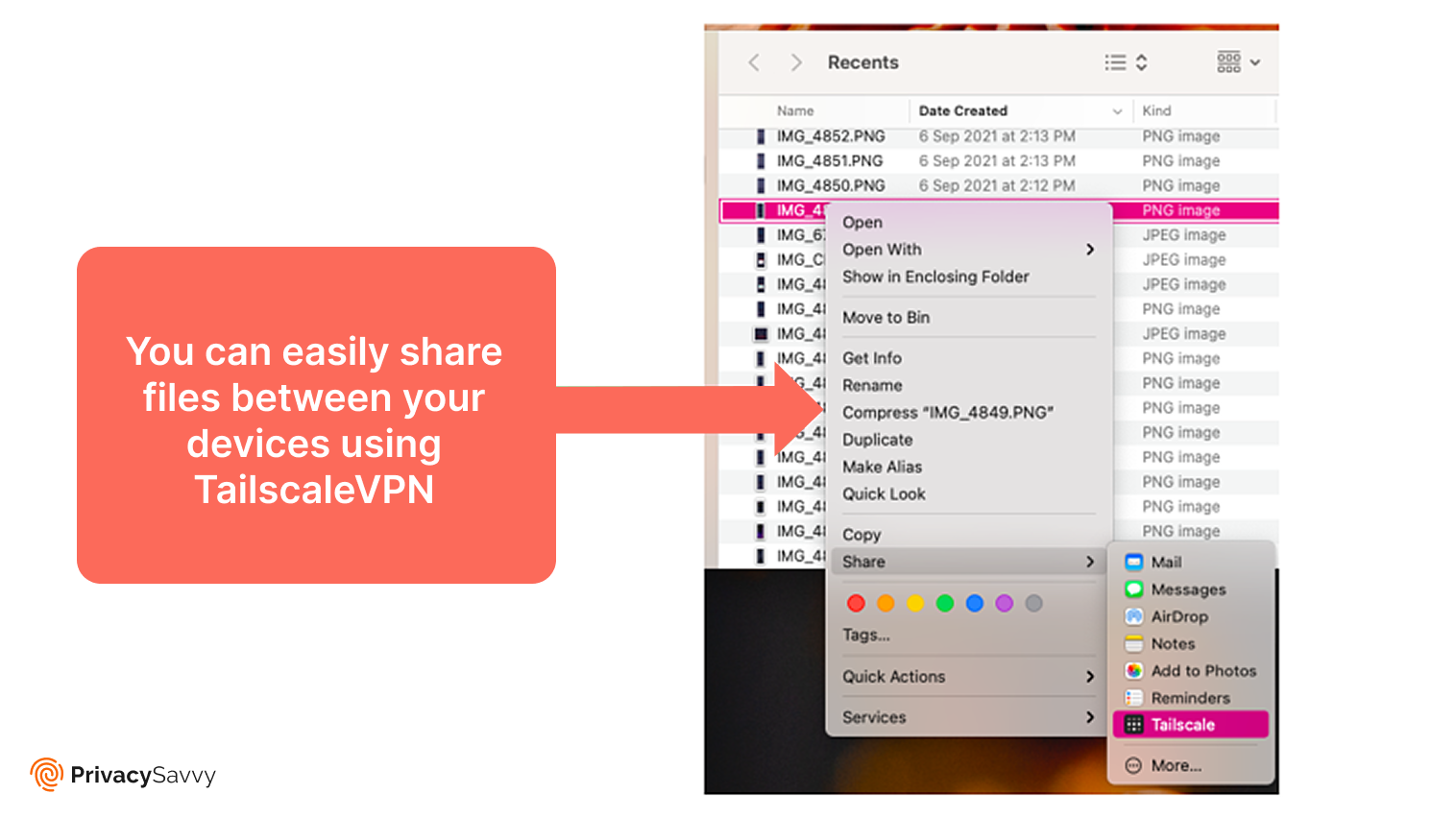
Tailscale has a file transfer feature known as Taildrop. It’s still in early alpha and is limited to transfers between personal devices, yet we tried it out.
On macOS, the feature was disabled by default for security reasons, but we activated it from the extensions menu. Once enabled, sending files was simple; right-click in the Explorer, choose Send with Tailscale, and choose the device.
The transfer was quick and secure (thanks to the WireGuard protocol), and the files appeared in our download folder within a short while.
Tailscale can act as a traditional VPN if you configure an exit node. For example, you can install Tailscale on your home or office computer and mark it as an exit node. Then, when on an unsecured WiFi (which is an active hub for attackers), just connect and route traffic through it.
Similar to a standard VPN, Tailscale routes your traffic securely through your chosen exit node before reaching its final destination. The speeds aren’t the fastest, but the feature works and is included in the free plan.
Security – Is Tailscale secure enough?
Tailscale is built around a zero-trust security model, which means it never assumes that any device, user, or connection is trustworthy by default (even if it already sits inside your private network). Every connection must be explicitly authenticated and authorized before access is granted, significantly reducing the risk of lateral movement in case one device is compromised.
Each device-to-device connection is protected with end-to-end, peer-to-peer encryption, ensuring that your data remains private while moving across the network. Unlike traditional VPNs that route traffic through centralized servers, Tailscale establishes direct, encrypted tunnels between devices, minimizing exposure and improving performance.
Under the hood, Tailscale relies on the WireGuard protocol, one of the most secure and efficient VPN protocols available today. WireGuard’s modern cryptography and lean codebase help deliver strong security with low latency, making Tailscale both safe and fast for everyday remote access and internal networking.
Privacy – Does Tailscale protect privacy?
Tailscale isn’t privacy-friendly like widely-used premium VPN services, such as NordVPN. Although it lets you build a private network, it still requires contact with Tailscale’s coordination server. (If you want to explore more privacy-friendly VPN services that can protect you online, read our article here.)
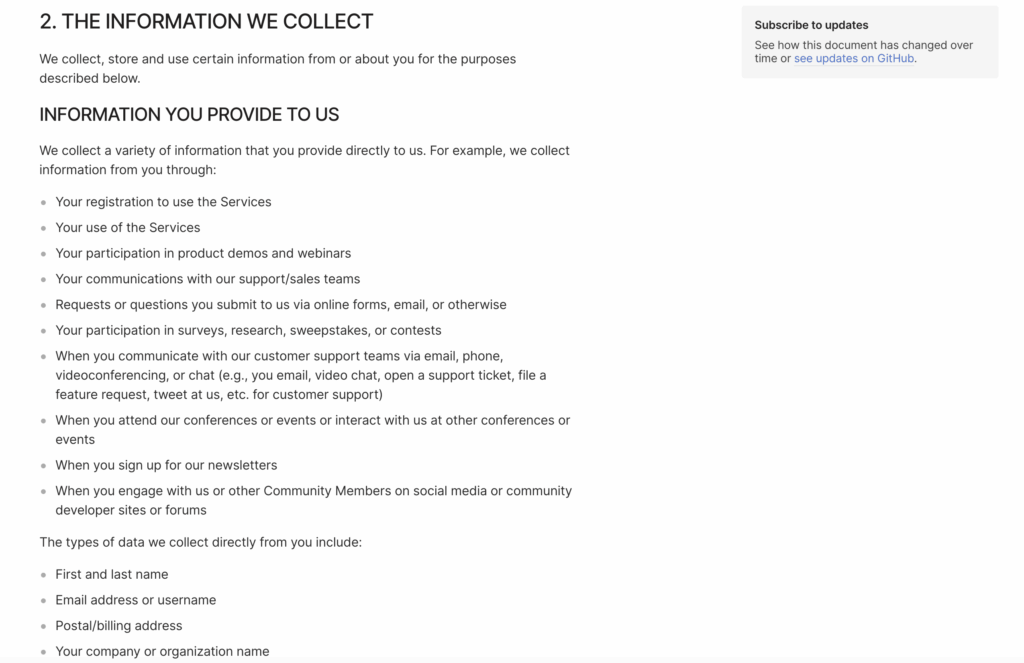
According to its privacy policy, Tailscale collects details such as device hardware, hostnames, and IP addresses. The company claims this information helps to track app activity, improve performance, and customize the in-app experience.
This raises concerns since Tailscale is headquartered in Canada, a member of the Five Eyes Alliance (a group of countries that share intelligence data).
Streaming – Not suitable for streaming
Tailscale VPN isn’t designed with streaming in mind. Its primary purpose is to securely connect your own devices and private networks, allowing you to access files, services, and systems remotely rather than bypass geo-restrictions on entertainment platforms.
That said, you can stream with Tailscale if you set up an exit node. By routing your internet traffic through another device located in a different region, you can appear to be browsing from that location and access region-restricted streaming services. This setup can work well if you already own a device in the target country, such as a home server or personal computer.
However, there are important limitations. At present, only Linux devices can reliably function as exit nodes, which significantly restricts usability for most casual users. Even when properly configured, streaming performance depends heavily on the exit node’s internet speed, hardware capability, and distance from the streaming service. Unlike commercial VPNs, Tailscale does not optimize servers for streaming or regularly rotate IP addresses to avoid detection.
As a result, Tailscale lacks the consistency and convenience required for seamless streaming. If your main goal is to watch streaming platforms like Netflix, BBC iPlayer, or other geo-blocked platforms without setup headaches, a dedicated streaming VPN is a far better option. Tailscale shines as a secure networking tool, but for streaming alone, it’s simply not the right fit. (If you are seeking a complete VPN for streaming, we shortlisted the top options.)
Speed – Is Tailscale fast enough?
Tailscale delivers solid transfer speeds when moving files between connected devices. Because it primarily creates direct peer-to-peer connections, it doesn’t route all your traffic through centralized servers like traditional VPNs, which means your regular internet connection remains largely unaffected.
Built on the WireGuard protocol, Tailscale benefits from one of the fastest and most efficient VPN technologies available today. This results in low latency and high-speed P2P transfers, making it an excellent choice for syncing files, accessing remote systems, or managing private networks across locations.
That said, Tailscale’s speed advantages mainly apply to device-to-device connections rather than general internet use. If your priority is high-speed performance for streaming, gaming, or torrenting, a commercial VPN optimized for those activities will deliver more consistent results. In that case, it’s worth exploring these tried-and-tested fastest VPNs designed specifically for speed-intensive tasks.
Server network – Does Tailscale offer many servers?
Unlike a traditional VPN, Tailscale doesn’t have worldwide server coverage. Instead, it allows you to create a private network by linking your different devices.
To set it up, install the client on each device and join them to your Tailscale network. Once the network is set up, you can transfer files securely between devices.
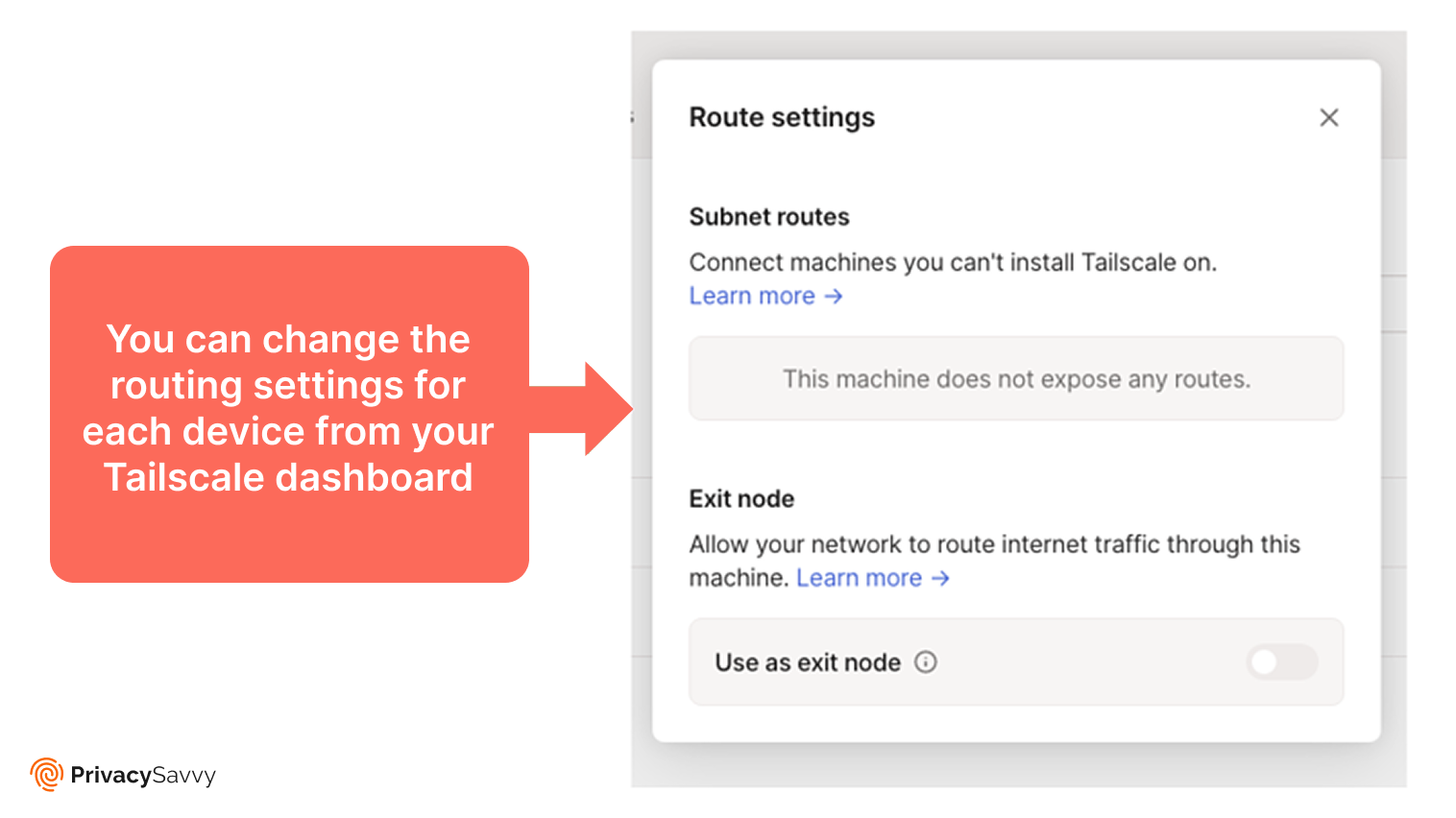
It gives you various options to connect your devices. For example, in the dashboard’s Route settings, you can set up a subnet or an exit node. The subnet route connects devices that don’t support Tailscale, while the exit node routes your internet traffic through a different device.
Although Tailscale doesn’t have a classic server network, it offers a different solution. You can use it to securely connect devices, share files, host game servers, or browse with a safe connection.
Torrenting – Does Tailscale support P2P?
Tailscale does support peer-to-peer (P2P) connections, but it’s important to understand what that means in practice. Unlike traditional VPNs, Tailscale is not built to mask your IP address or anonymize torrent traffic. Instead, it focuses on creating secure, direct connections between your own devices.
Because of this, Tailscale can improve file-sharing speeds between trusted devices, making it useful for transferring or accessing already downloaded torrents across your private network. The direct P2P connections reduce latency and avoid the bottlenecks often associated with centralized VPN servers.
However, Tailscale is not an ideal solution for torrenting itself, especially if privacy and anonymity are your priorities. If you plan to download torrents from public swarms, a traditional VPN with strong privacy protections, a no-logs policy, and optimized P2P servers is a much better option. (Explore our top-recommended VPN services for unlimited and safe torrenting.)
Device compatibility
Tailscale is a user-friendly service and has over 100+ integrations. With single sign-on (SSO), you can log in using credentials from over 20 providers, including Google, Okta, Microsoft Azure AD, GitHub, and Apple. In fact, you don’t need to create another account – just sign up with your existing login.
The VPN’s custom Windows, Android, Mac, Synology, and Linux apps allow you to use it almost everywhere.
Since the service is designed to connect you to your network seamlessly, even behind strong enterprise firewalls, it supports pfSense, Barracuda, OPNsense, Cisco, Check Point, Fortinet, and more.
With these integrations, you can receive alerts through Slack, Google Chat, or Discord. Also, if you want private browsing like a standard VPN, Tailscale includes Mullvad support (although it’s less reliable than services like NordVPN).
Simultaneous device connections
The number of simultaneous connections depends on your plan. For example, the basic personal plan supports 20 devices, while the personal pro plan features 100 devices.
However, keep in mind that the basic plan supports only one user, even though it lets you connect many devices.
With the higher-tier plans, you can add unlimited users for a fixed monthly fee and increase the number of devices each user can connect.
Also, if you need more device connections, the Enterprise plan offers unlimited devices, unlimited admin users, unlimited subnet routers, and other advanced features.
Installations and apps
Since Tailscale lets you build your own virtual private network, it’s simple to configure and install. We tried it on our macOS device, and setting it up was incredibly easy and quick.
Because device login uses SSO, you only need to link your Microsoft, Okta, Google, or another supported provider to your Tailscale account.
If you want to connect a new device, install the Tailscale app and log in with your account. The dashboard will then display all linked devices. Once the VPN is active, you can transfer files between them.
The Tailscale VPN allows you to do much more. For example, it lets you configure private gaming servers, access your computer remotely, and add multi-factor authentication.
Pricing
Tailscale’s free plan lets you test the service at no cost. It supports three users, up to 100 devices, and includes email support. However, advanced features like the network traffic logging off are excluded.
The Starter plan removes the user cap. You’ll still get the three users as for the free tier, and each additional user is $6 per month, with more devices allowed per user. This pricing model is ideal for most businesses.
The premium plan is relatively expensive at $18 per user. However, you’ll get 20x devices per user and faster support, tailored access control, encryption, and SSH authentication, and more.
Oddly, the free tier offers features that the Starter plan lacks. For instance, you can restrict individual users from specific resources, something that isn’t available on the Starter plan.
Reliability and support
Customer support responds quickly, but the help isn’t always helpful.
Thankfully, the official website offers plenty of guides and an active blog, covering topics from setup to hosting Minecraft servers.
Support is also available via email and social media. When we tested the email, the reply came within a few hours, but only directed us to the blog.
Upgrading to the Enterprise plan gives you Priority support, where your requests are queued ahead of standard tickets.
Does Tailscale work in China?
Tailscale cannot work in China because of its architecture. It uses the WireGuard protocol, which doesn’t obfuscate your location, so it’s easier to detect and block. As a result, it may not work in China.
Moreover, Tailscale needs brief communication with its central coordination server to establish device connections. If it’s blocked, the network can’t form.
How Tailscale protects you
Tailscale makes it easy to access your devices from anywhere worldwide effortlessly and securely, even on public Wi-Fi. Here is how else Tailscale protects your connections.
1. WireGuard Noise protocol
WireGuard is built on the Noise protocol framework, which is highly secure and flexible. Since the Noise framework has almost no built-in negotiation, it minimizes the risk of a downgrade attack.
2. Daily login key rotation
Tailscale can protect Secure Shell Protocol (SSH) access by linking it to your existing authentication provider. SSH relies on keys to grant encrypted shell access to your servers.
The VPN rotates your SSH keys often by requiring you to reauthenticate on the client. It also makes it easy to revoke SSH access from any device.
3. Low latency and guaranteed privacy
Tailscale delivers extremely low latency by using decentralized VPN tunneling. As a result, your remote workers will experience fast connections from any location.
Moreover, Tailscale works as an overlay network, routing traffic only between devices on your network without passing it through its own servers. This means you’ll always get reliable privacy and top speeds.
Tailscale also collects data from both endpoints to protect the network traffic. This process verifies integrity and helps detect a man-in-the-middle attack.
How to create an exit node in Tailscale
An exit node allows one Tailscale device to route all internet traffic for other devices on the network—similar to a traditional VPN gateway. This is useful when you want to browse the internet using the IP address of a specific location or securely route traffic through a trusted device.
Step 1: Enable IP forwarding on the exit node
On the device you want to use as an exit node, enable IP forwarding:
- Linux: Enable IPv4 forwarding using system settings (e.g., sysctl)
- macOS / Windows: Tailscale will guide you through the required permissions automatically
Step 2: Advertise the exit node
Run the following command on the chosen device:
tailscale up –advertise-exit-node
This tells Tailscale that the device is available to route internet traffic for others.
Step 3: Approve the exit node
- Log in to the Tailscale admin console
- Go to Machines
- Find the device advertising the exit node
- Approve it as an exit node
Step 4: Use the exit node
On any other device in your Tailscale network:
- Open the Tailscale client
- Select Use exit node
- Choose the approved device from the list
Once enabled, all internet traffic from that device will route securely through the exit node using encrypted WireGuard tunnels.
Tailscale VPN alternatives
| Features | NordVPN | Surfshark | Proton VPN |
|---|---|---|---|
| Encryption | AES-256, NordLynx (WireGuard), OpenVPN | AES-256, WireGuard, OpenVPN, IKEv2 | AES-256, WireGuard, IKEv2, OpenVPN |
| Servers | Over 8,000 servers in 120+ countries | 3,200+ servers in 100 countries | Over 12,000 servers in 120+ countries |
| Business features | Business plans, dedicated IPs | Business plans, multi-user support | Proton for Business with custom options |
| Devices | 10 devices per account | Unlimited devices | 10 devices per account |
| Cheapest plan | $3.29/month (2-year) | $2.29/month (2-year) | Free plan, paid form $4.99/month |
FAQs
Tailscale isn’t a standard VPN. Instead of routing your traffic through remote servers, it’s designed to link your devices directly. Think of it as a personal VPN that enables you to access your devices remotely.
Tailscale uses WireGuard technology to build encrypted tunnels between your devices. This allows you to access them remotely and share files as if they were on a single local network.
Yes, Tailscale is secure as it uses a zero-trust model that encrypts every connection. However, it logs significant metadata. Plus, since the provider is based in Canada, it falls under the Five Eyes Alliance intelligence-sharing agreements.
No. Tailscale is designed to enable you to create your own virtual private network. It doesn’t have servers for bypassing geo-blocks on popular streaming services like Netflix. So, you can’t use it for streaming like with traditional VPNs.
Tailscale works well on various devices and operating systems, including Android, Windows, macOS, iOS, and Linux. This means you can use it with your phones, computers, tablets, and even servers.