Data leaks are no longer rare incidents; they’re routine. If your organization’s sensitive data isn’t already exposed somewhere online, it’s likely only a matter of time. Worse, most leaks go unnoticed until real damage is done.
According to IBM, the average cost of a data breach now stands at $4.44 million globally. The most effective way to avoid that cost is prevention. That’s where Data Leak Protection (DLP) comes in. DLP solutions help prevent unauthorized access, sharing, or exposure of sensitive data, whether it’s caused by human error, insider risk, or misconfigured systems.
This guide explores what data leak protection is, how it works, and how to implement it effectively. Drawing on years of hands-on experience with DLP in real-world cybersecurity environments, this guide gives you practical steps to identify risks, protect critical data, and stop leaks before they happen.
What is data leak protection?
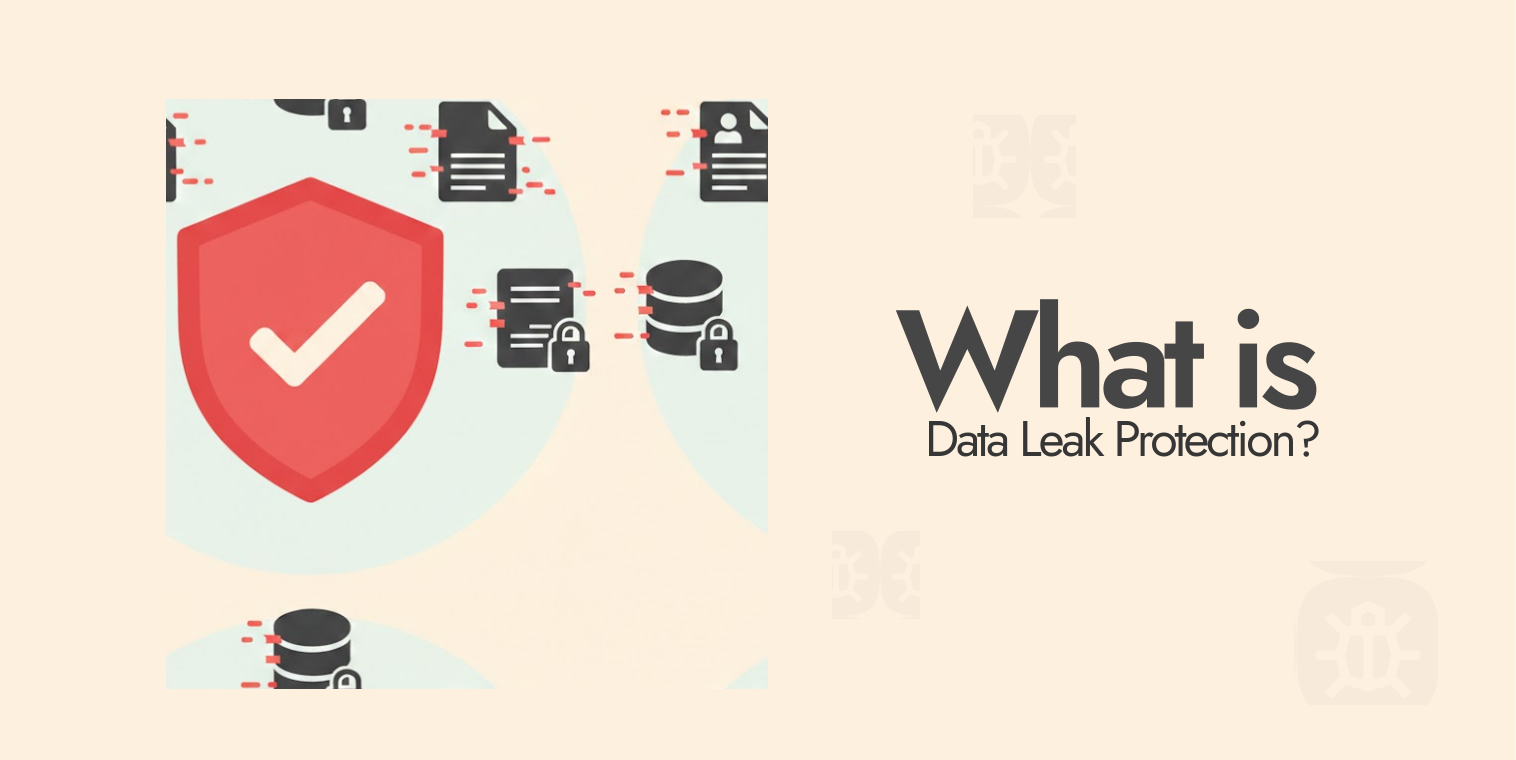
To put it simply, Data Leak Protection (DLP) acts as a security guard for your sensitive information, ensuring nothing leaves your environment without authorization. It’s not just a single tool but a combination of technologies, policies, and monitoring systems that work together to keep confidential data exactly where it belongs.
Whether it’s personal records, financial data, or proprietary business files, DLP gives you visibility and control over how that information is accessed and shared.
DLP solutions monitor your data across three critical states: data at rest, data in motion, and data in use. Data at rest includes files stored on devices, servers, or cloud storage. (We have put together a list of the top free cloud storage services to use today if you want to explore.) Data in motion refers to information traveling across networks, such as emails or file transfers.
Data in use covers information actively being accessed, edited, or processed. By continuously monitoring all three states, it can detect suspicious activity and stop potential leaks before they occur.
At its core, DLP solutions identify sensitive data, track how it moves, and enforce policies that prevent unauthorized sharing. For example, if someone tries to email a file containing credit card numbers or upload confidential company code to an external platform, the DLP system can automatically block the action, alert administrators, or encrypt the data to prevent exposure.
Modern DLP systems go far beyond simple file labels. They analyze patterns, detect sensitive information such as financial details or personal identifiers, and use advanced techniques like behavioral analysis and machine learning to recognize risks, even when data isn’t clearly marked as confidential. This proactive approach allows organizations to prevent leaks before they turn into serious breaches.
Whether used by small businesses or global enterprises, all DLP systems follow the same core principles: identify sensitive data, monitor its movement, and enforce strict controls to prevent unauthorized access or transfer. By doing so, DLP plays a critical role in protecting privacy, maintaining compliance, and reducing the risk of costly data breaches.
How does data leak protection actually work?
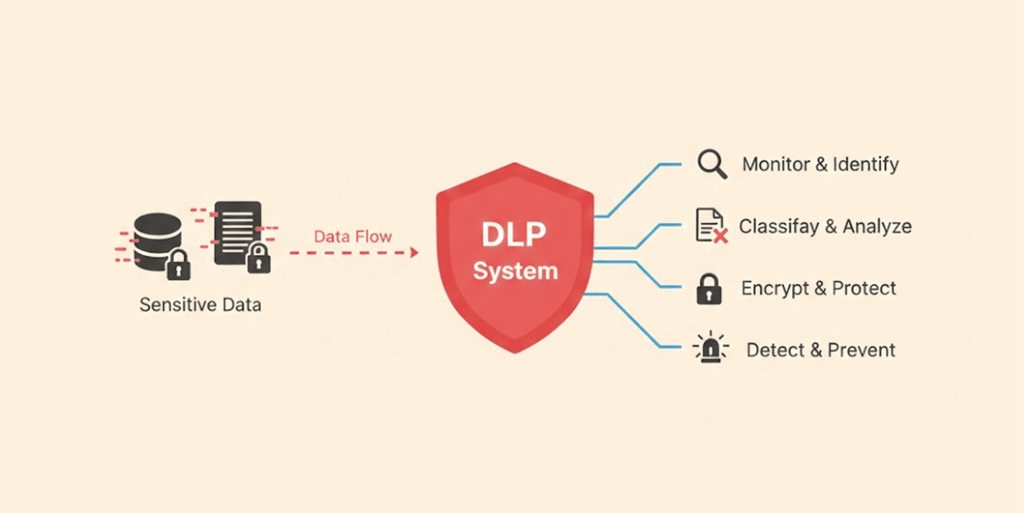
There’s really no long story about it; DLP solutions follow a three-step process: discover, monitor, and protect. Simple:
- Discovery phase: Here, the system dives into every corner of your digital world, file servers, databases, employee laptops, and cloud drives. It hunts down anything sensitive, lining up all the files that match your security rules. That could be customer details, financial reports, trade secrets, you name it. Remember the shock last year when BCNYS (Business Council of New York State) found over 47,000 files with confidential data, including protected health info, just floating around in the wrong places.
- Monitoring phase: Here, the DLP constantly keeps watch over your data. It keeps a log of everything involving that data. Is someone trying to copy a file onto a flash drive, attach documents to an email, or upload to Dropbox? All this monitoring happens in real-time to make sure nothing slips by without your notice.
- Protection phase: Here’s where the rules you’ve set up come into play. Protection enforces those rules by stopping you from making any risky moves or preventing you from accessing files that may be suspicious. It can also encrypt files while they’re being created or send alerts to the security department when there are signs of suspicious activity.
- What are data leak protection examples like in real life: Take an employee trying to send customer info to their personal Gmail. The DLP spots the protected data, stops the email cold, and lets IT know. That data never leaves the building.
Sometimes, one DLP technique alone won’t give you the best. So, most DLP solutions stack up a handful to get the job done:
- Regular expression matching scans for predictable patterns: 16-digit credit card numbers, nine-digit Social Security numbers, anything that fits a mold.
- File checksum analysis checks whether database security is actually holding up, or just there for show.
- Structured data fingerprinting (exact data matching) compares content to catch exact matches pulled straight from a live database.
- Partial data matching catches fragments, including multiple versions of the same form, even if different people filled them out.
- Statistical analysis leans on machine learning to flag anomalies that look like leaks in progress.
- Lexicon matches comb through unstructured text using dictionaries and rule sets to flag sensitive terms that are hiding in plain sight.
- Categorization detects violations based on what type of data it is, not just content.
- Exact file matching compares file hashes against known fingerprints. If the hash matches, the alarm is set off.
Types of DLP
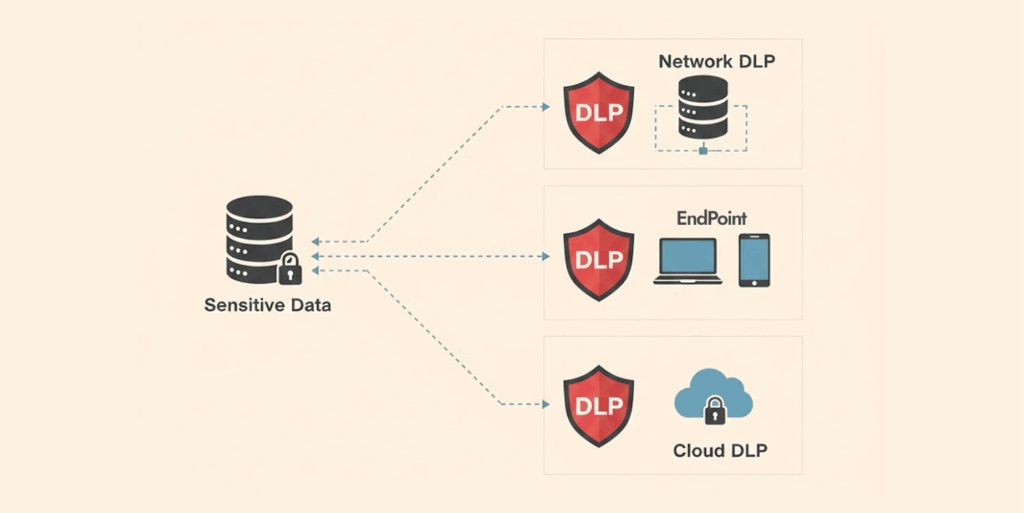
Data leak protection isn’t one-size-fits-all. Most companies set up DLP in three main ways, each guarding a different weak spot:
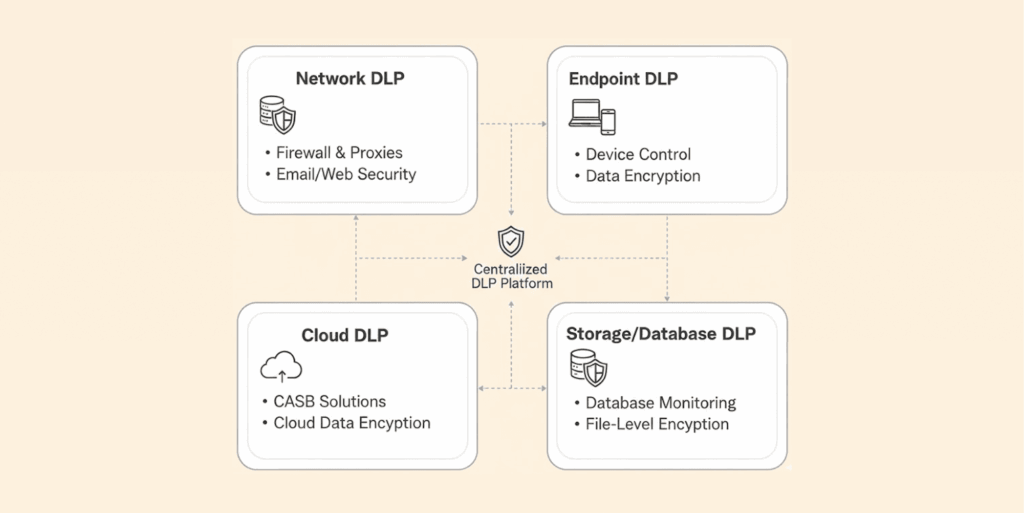
- Network DLP: This one sits at the edges, email gateways, web filters, and network exits. It checks everything trying to leave, like someone emailing a secret file or uploading sensitive docs to a website. A solid network DLP, when set up correctly, should be able to catch about 60 to 70% of attempted leaks.
- Endpoint DLP: It lives in your devices, laptops, desktops, and phones to monitor what the user does locally (things like copying files to USB drives, taking screenshots of sensitive info, or saving documents to cloud accounts that you didn’t authorize). With everyone working from everywhere these days, endpoint DLP is a lifesaver. They’re very effective in cutting down and preventing USB data theft (commonly known as juice jacking).
- Cloud DLP: As more companies move to the cloud, this tool tags along. DLP integrates really well into other platforms such as Microsoft 365, Google Workspace, Salesforce, and AWS to monitor sharing of files in the cloud, monitor use of collaboration tools, and ensure that sensitive files in the cloud are properly secured/encrypted. (We have a detailed guide that uncovers everything about cloud security. Read it if you need.)
Most businesses need all three types working together to actually cover their bases. Those gaps between layers? That’s where the leaks sneak through.
What are the main causes of data leaks?
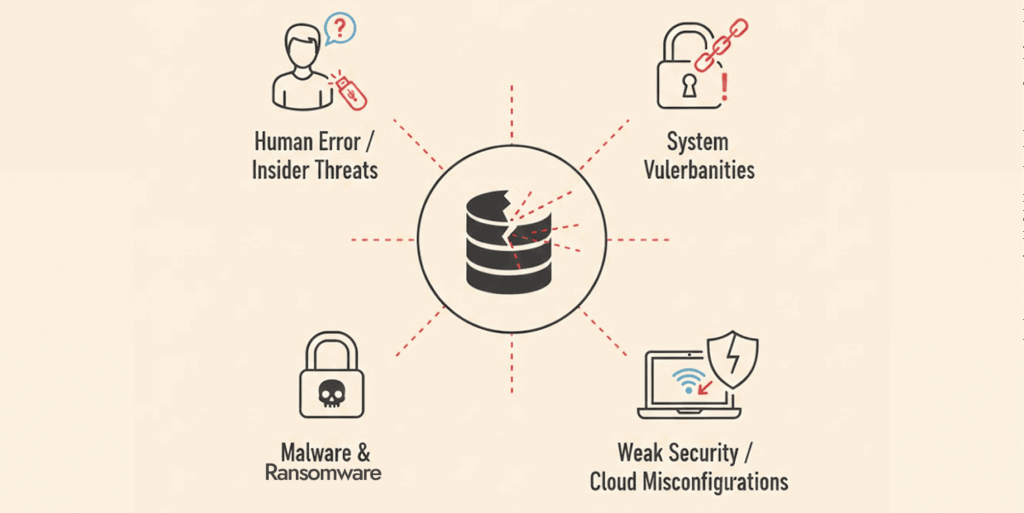
Experience and analysis of multiple data leak incidents show that most leaks aren’t caused by expert hackers breaking in. It’s usually small mistakes and oversights that cause data leaks. Here’s how:
Human error and accidental exposure
Most breaches are caused by small slip-ups people make. Like an employee mistakenly sending an email to the wrong person, or accidentally posting some private documents to public websites, or misconfiguring cloud storage permissions.
The numbers back it up: Verizon’s 2024 Data Breach Investigations Report says human error leads to about 82% of breaches. Sometimes it’s as basic as mistyping an email address. Other times, someone shares a Google Drive link without realizing anyone can see it.
In one example, someone shared on Reddit how his manager mistakenly shared a confidential folder containing records of the salaries of every employee in the company with another employee, allowing them to see everyone else’s salary.
Situations like this can throw the organization into chaos, and even worse, if someone with malicious intentions gets their hands on this file, it could cause serious problems, and that’s a violation of employee privacy.
Insider threats and malicious intent
Not every leak is an accident. Employees who are unhappy with their job or those there as spies, or people leaving your company to work for the competitor, sometimes steal sensitive files (like trade secrets, customer data, and other confidential information).
They might decide to save this information in USB drives or take screenshots of it and trade them with others out there for money. Patterns like these are exactly what data leak protection tools look for, like an employee who’s never touched certain files suddenly downloading thousands of them right before quitting.
Weak access controls and excessive permissions
Another big issue that causes data leaks is weak access controls. When everyone has access to everything, you’re just asking for trouble. Companies often hand out way more permissions than needed.
That summer intern probably doesn’t need to see the company’s financials, and your sales rep doesn’t need access to the full customer database. For example, 78% of respondents in one survey said their organizations have witnessed a data breach because of negligent or malicious employees, or other insiders.
Inadequate security policies
A company’s policies on handling data can have a huge impact on how much of a risk human error is. If there aren’t clear guidelines for how to handle company data, employees often will act based on their feelings and emotions, which may not always conform to security best practices, thereby creating a significant amount of risk.
Unencrypted data transmission
Here’s another one people run into all the time: sending sensitive info without any encryption. It’s like putting cash in an unsealed envelope and dropping it in the mail; anyone along the way can just reach in and grab it. If you send emails or payments without proper protection, you’re basically handing your data over to anyone who wants it.
Third-party and vendor risks
Do not forget about your partners and vendors. Your security is only as good as theirs. When you give a third party, such as a contractor, vendor, business partner, or cloud provider, access to your data, you are trusting that they’ll have enough measures to protect it.
But if the third party has weak security measures in place, your data will possibly leak when a compromise happens, even if your own system is well protected. We saw this happen many times in the past year, where attacks on contractors and supply chains caused exposure of company-sensitive data.
One example is the Salesforce 2025 data breach, where attackers exploited apps (Drift, Gainsight, and other third-party providers) connected to Salesforce to steal data.
Shadow IT and unauthorized apps
Another area of risk to businesses is “shadow IT,” which refers to employees using applications or services that the company’s IT department did not support or approve of. If employees are using unapproved cloud applications, there will be no one monitoring to protect those unsecured clouds or the data within them.
In a 2024 survey, 65% of employees admitted that they use unapproved applications to improve their productivity and make work easier when they feel the tools their organization provides don’t meet their needs.
Finally, most data leaks do not require a sophisticated criminal network. Oftentimes, data breaches happen because of a little mistake someone made or an employee just didn’t pay attention. Maybe a staff member was finding work difficult and decided to cut corners or bypass some security steps to finish a task more quickly.
Or they just forget security rules. To avoid data leaks, keep your rules clear and simple, be strict about who can access what data, and encourage people to use their heads.
Key elements of an effective data leak prevention strategy
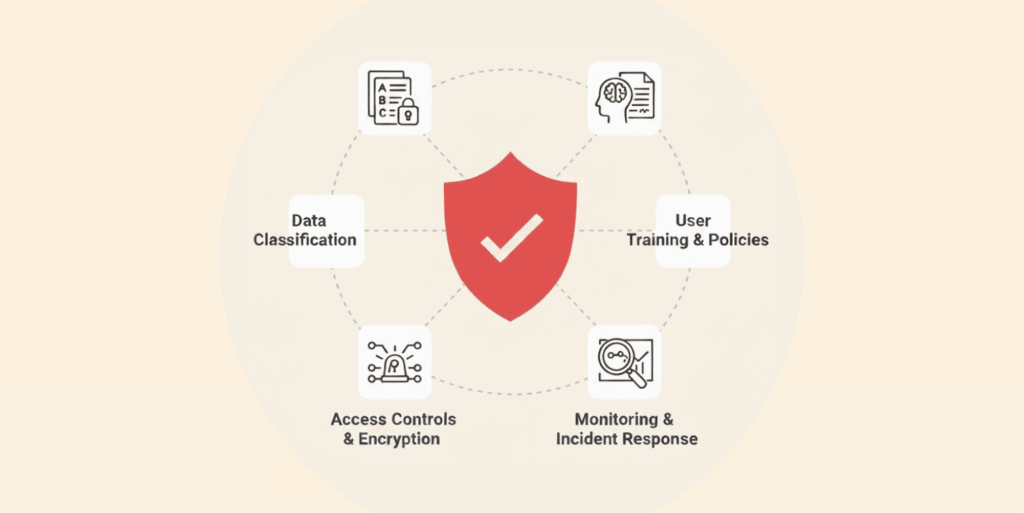
To keep data safe from leaks, simply adding new software isn’t the whole story. Real data leak prevention covers people, processes, and tech; there’s no shortcut. After helping dozens of organizations set up DLP, here’s what actually works:
1. Data discovery and classification
You can’t possibly protect something you can’t see, so start by identifying all the spots where sensitive data lives – the file server, in a database, on employee devices, cloud storage, or even buried in old emails (archives).
Identifying this data means a whole lot, and when you do, classify it. Not every file needs the same level of protection. Lock down customer credit card info way tighter than, say, a public product catalog.
Most companies use categories like public, internal, confidential, and restricted. We’ve noticed that when teams take the time to classify their data properly, they end up with about 40% fewer false alarms in their DLP alerts, and it also shortens detection time.
2. Create policies and enforce them
Get specific about your security policies. Can employees send customer data outside the company? Are they allowed to upload financial reports to their personal cloud? Should anyone be able to print confidential documents?
Once you’ve decided, set up your data leak prevention solution to enforce those rules automatically, not just whatever generic template came with the software. Too many organizations just turn on default settings and hope for the best, then wonder why real threats get missed, or people can’t do their jobs.
3. User education and awareness training
Tech alone can’t stop data leaks; people handling data have a huge role to play. That’s why your employees need to understand what data is sensitive and why. Also, make them see how their actions can create risks of data leaks.
Be practical in your training by providing real examples of bad behavior to avoid when handling sensitive data, and the cost of data leaks. Clarify procedures and instructions for how to properly handle sensitive data. A report from KnowBe4 shows that leaks were reduced by more than half (65%) just by running straightforward training sessions every quarter.
4. Monitoring and incident response
Once you’ve located and sorted your private info, you’ve got to keep an eye on it. Watch for problems as they happen and figure out how to handle any privacy breaches. Have a go-to person ready to help if something leaks. How do you investigate? How can you contain the leak and recover? A solid plan means fixing things way faster than just guessing what to do.
5. Regular compliance checks and audits
You need to perform regular compliance audits and audits of your company’s DLP system. This ensures that all the data your data leak prevention tools have accumulated has been processed to provide meaningful information.
The data you collect will help identify patterns, fill in policy gaps, and review the effectiveness of your protection systems. Additionally, there are multiple data retention and management regulations, including but not limited to GDPR, HIPAA, and PCI DSS, which require you to demonstrate to regulators that your company’s systems manage and protect data appropriately.
6. Integration with existing security protocol
Lastly, make your data loss prevention part of your whole security setup. Plug it into your security information and event management for better logs, link it to who’s allowed to see what, and use encryption to be extra safe.
Every connection makes your defenses stronger. In fact, a study showed SIEM boosted threat detection by up to 50%, imagine what a power combo it’ll be if you integrate it with DLP.
The key takeaway from developing a strong DLP strategy is that it requires much more than technology; it also requires an understanding of your data and its purpose, defined and understood data use policies, a commitment from your employees to abide by appropriate data use policies, and well-defined processes for detecting and correcting data leaks before they result in significant harm.
Why is data leak prevention critical for mobile apps?
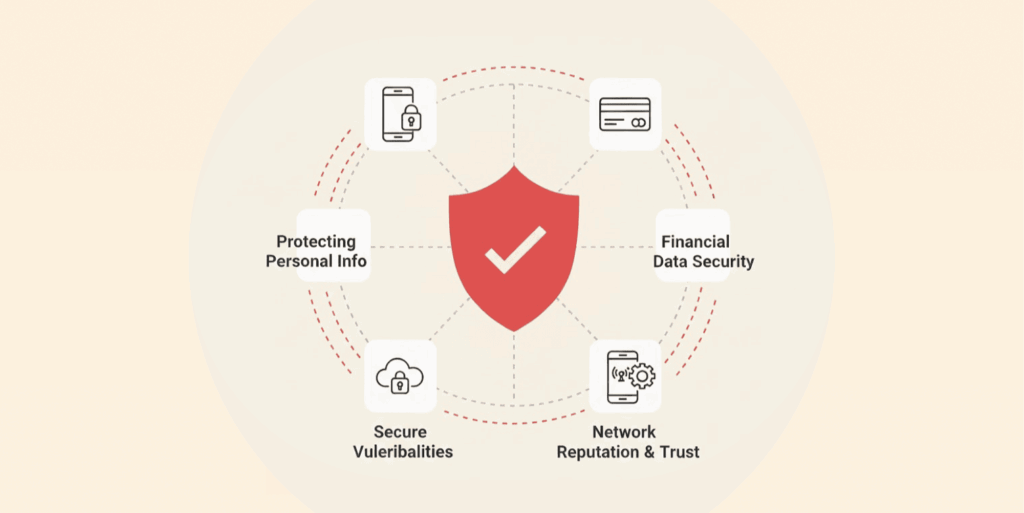
Mobile devices have become one of the weakest links in modern data security because employees constantly access sensitive company information through smartphones and tablets. These devices handle customer records, business communications, and confidential files while often connecting to unsecured public Wi-Fi (which contains a severe threat to your web data), installing unverified apps, or being lost or stolen.
Traditional network-based security tools struggle to protect data in these environments, which makes mobile-specific Data Leak Prevention (DLP) essential.
Mobile DLP prevents risky behaviors such as taking screenshots of sensitive emails, copying confidential data, or uploading company files to personal cloud accounts. Many mobile apps also introduce serious risks by storing passwords in plain text, transferring data without encryption, requesting excessive permissions, or saving sensitive information in unprotected cache folders. These weaknesses make it easier for attackers to access and exploit confidential data.
To prevent leaks, organizations must integrate DLP directly into mobile apps and devices. This includes encrypting data stored on devices, using secure protocols like TLS 1.3, implementing certificate pinning to block spoofing attacks, using a secure security tool like a VPN for mobile devices, restricting copy-paste actions, and preventing screenshots of sensitive information.
Mobile Device Management (MDM) and Mobile Application Management (MAM) tools further strengthen protection by enforcing encryption, controlling app access, remotely wiping lost devices, and monitoring how data moves across mobile systems.
These protections are critical because mobile risks are widespread. Studies show that 77% of mobile apps can potentially leak personally identifiable information (PII) due to insecure data handling practices. Mobile DLP helps organizations monitor, control, and secure sensitive information, ensuring it stays protected even in today’s mobile-first workplace.
Data leak prevention vs. data loss prevention: Understanding the key differences
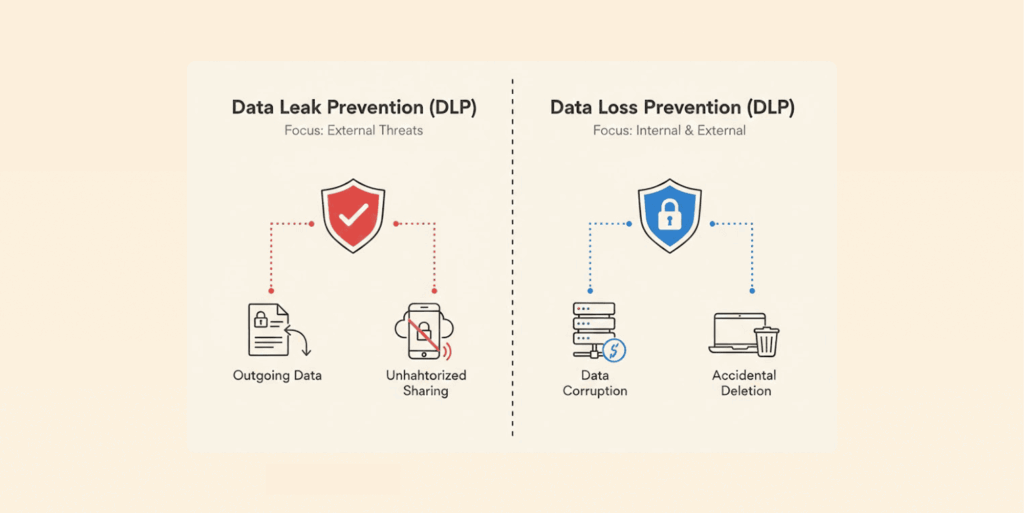
Many individuals don’t realize that when they hear about either data loss prevention (DLP) or data leak prevention (DLP), they actually refer to two distinct concepts, which are easily confused. Here’s the difference: leak prevention is about stopping sensitive info from getting out, whether by accident or on purpose. It’s all about controlling who sees what, and where data can go.
Data loss prevention covers a bigger picture. Data loss prevention (DLP) refers to preventing loss of data for any reason. It protects against scenarios such as: someone deleting the wrong file, the server crashes, disasters that cause you to lose files, data encryption due to ransomware, or maybe malware corrupted your file.
With data loss prevention (DLP), your concern would be with making sure you have frequent backups of your data, a clear plan to recover from a disaster/backup plan, and measures to recover your data regardless of how you lost it.
If an employee sent personally identifiable customer information (PII) via email to a competitor, that would be considered a data leak. If a server dies and there’s no backup, that’s a loss.
Security vendors often use “DLP” to mean both data leak and data loss prevention, but typically it refers to tools that stop unauthorized data transfers, not backups.
Both help protect data, but for full security, you need both DLP and data loss prevention to ensure recoverability if something goes wrong.
Day-to-day, leak prevention means actively monitoring and controlling how data moves, whereas loss prevention focuses on recoverability and redundancy. Both matter a lot. If you have found that your data is public and want to remove it from the records, you can use data removal services.
What DLP solutions and tools should you consider?
The Data Leak Prevention (DLP) market offers tools ranging from enterprise-grade platforms to lightweight, budget-friendly solutions. The best choice depends on your organization’s size, infrastructure, and security needs. Based on real-world testing and deployments, several tools stand out in specific categories:
Enterprise-grade DLP platforms
- Symantec DLP (Broadcom) – Comprehensive protection across endpoints, networks, and cloud with advanced data classification and fingerprinting.
- Digital Guardian – Strong endpoint and insider threat protection with detailed monitoring and flexible deployment options.
- McAfee Total Protection for DLP – Unified data protection with centralized control and strong policy enforcement.
- Forcepoint DLP – Uses behavioral analytics and machine learning to detect and prevent data leaks.
- Proofpoint DLP – Excellent for email and cloud data protection, with strong threat detection capabilities.
Cloud-focused DLP solutions
- Microsoft Purview DLP – Seamlessly integrates with Microsoft 365 and protects cloud apps, emails, and files.
- Google Workspace DLP – Built-in protection for Gmail, Drive, and other Google services with easy deployment.
- Netskope DLP – Specialized for cloud environments, offering visibility and control over cloud data movement.
Endpoint-focused DLP tools
- Code42 – Ideal for remote teams, with strong insider threat detection and file activity monitoring.
- Digital Guardian Endpoint DLP – Advanced endpoint visibility and protection for laptops and desktops.
Budget-friendly and open-source DLP tools
- MyDLP – Cost-effective solution suitable for small businesses with basic DLP needs.
- OpenDLP – An open-source tool that provides essential protection but requires technical expertise to manage.
Each category serves different needs, from full enterprise protection to cloud-specific or budget-conscious deployments.
Criteria for choosing a data leak prevention tool
Trying to size up different DLPs to determine the best fit for your organization? Here are the things that really matter:
- Deployment model: Start by checking out how easy it is to deploy the tool. Cloud-based DLP solutions roll out fast and are easy to handle. You can usually get them up and running in just a few weeks, not months. On-premises gives you more control and is better if you’re in a highly regulated field.
- Content inspection capability: Make sure the tool can actually identify the data you care about. Look for features like pattern matching (credit cards, social security numbers), fingerprinting (or browser fingerprinting) for specific files, and document classification.
- Policy flexibility: You want to build policies that fit your business, not squeeze into someone else’s template. We’ve walked away from a big-name vendor because their policy engine couldn’t handle our complex workflow exceptions.
- User experience: DLP shouldn’t slow everyone down. Tools that tell users why something’s blocked, and show them how to fix it, save a ton of headaches. We’ve seen DLP-related helpdesk tickets drop by 71% just by improving the notification messages.
- Integration capability: The DLP needs to work well with the existing security architecture, cloud applications, and collaboration tools. Native integrations typically provide better performance than custom connectors.
- Reporting and analytics: You need clear, useful dashboards that show you what’s going on with violations, risks, and compliance status. Good executive reports make it easier to prove the DLP investment was worth it.
- Scalability is important: Can this solution scale with your company, both technically and in terms of licensing? As your company grows, there is potential for per-user licensing to quickly become very costly.
Every company’s needs differ, but considering the points above should help you find and effectively use the right solution.
Benefits of data leak protection
Data leak protection exists for three big reasons:
- Block things that shouldn’t be happening: DLP software watches traffic coming and going. Catches leaks, ransomware (malicious software), and an employee walking out the door with customer records? It shuts it down right there.
- Keeps compliance people happy: HIPAA, PCI DSS, GDPR, different names, but same requirement: keep customer and patient data secure. DLP helps you actually follow those rules. So you face fewer fines. Fewer lawsuits. And way fewer awkward calls asking why someone’s personal info showed up somewhere it didn’t belong.
- Actually know where your data lives: It’s hard to protect data you didn’t even know was sitting there. DLP shows you exactly where sensitive information is stored and where it travels. No more guesswork.
FAQs
DLP controls where data can go and who can access it, while encryption makes stolen data unreadable. Used together, DLP helps prevent leaks, and encryption ensures any escaped data is useless; many DLP tools combine both automatically.
It can, but a well-configured DLP setup has minimal impact. By focusing rules on critical data and using selective inspection, most users won’t notice any slowdown, typically around 3–7% at most.
It depends on company size and setup complexity. Small businesses can deploy basic DLP in weeks, while large organizations may take 3–6 months, with data discovery and classification being the most time-consuming. Starting with a small pilot helps speed up and refine the process.
That depends on your approach. Some organizations notify users when they break rules, helping them learn and reduce mistakes in real time. Others monitor silently and alert security only if an incident occurs, which can be useful for detecting insider threats.
Not anymore. While enterprise DLP tools are costly and complex, affordable options exist for smaller businesses. Many cloud platforms include basic DLP features, making data-leak prevention accessible to any organization handling sensitive data.